What is a UTM link and how does it work?
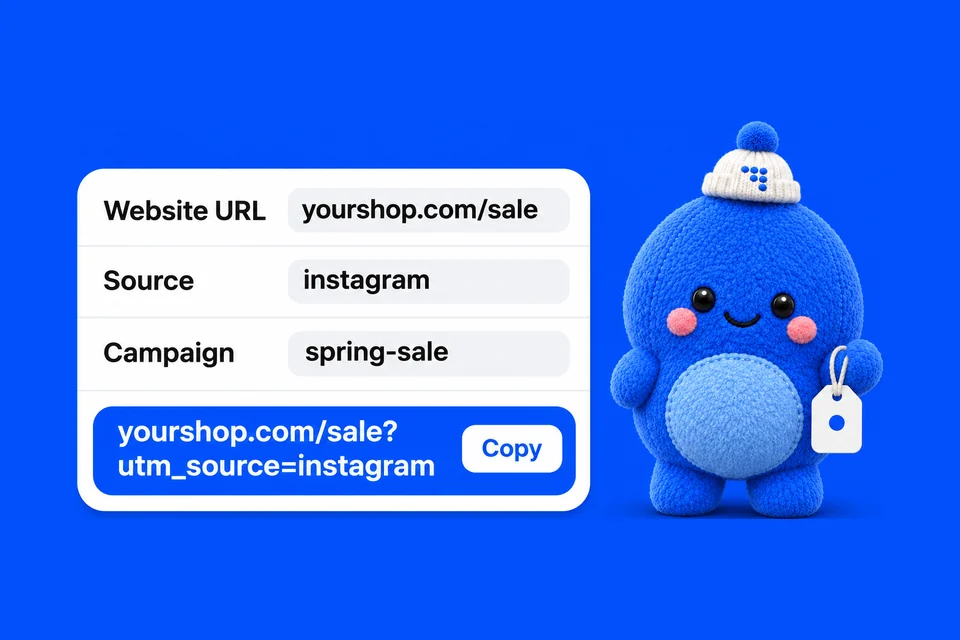
A normal link with labels added after a question mark, such as utm_source=instagram, so analytics knows where a visit came from.
Add UTM parameters to any link so Google Analytics shows which post, network and campaign sent each visit. Pick a network to fill them in.
Where the link goes
The site the visit comes from.
The kind of traffic.
One name for everything in this launch or sale.
Optional: tells two links apart.
Optional: mostly for paid search.
Kept in this browser only, so your last campaign is here next time.
Paste a link and pick a network. The tagged link shows here as you type.
The tagged link updates as you type, with every value encoded so the address never breaks.
Built in this tab: the links you tag and your campaign names never leave your device.
Tag a link for one post in under a minute.
Paste the page you want people to visit. Links that already have a query, like ?ref=menu, keep it in the result.
Choose where the link goes, like Instagram or LinkedIn, and source and medium are filled in. Then name the campaign.
The tagged link appears under the fields. Copy it into your post or bio, and the visits show up under that campaign.
UTM parameters are labels added to the end of a link, like ?utm_source=instagram&utm_medium=social. When someone opens it, Google Analytics and most other analytics tools read the labels and file the visit under them, so you see which post really sent people.
Three do most of the work: utm_source names the site the visit came from, utm_medium says what kind of traffic it is, and utm_campaign groups everything for one launch or sale. utm_content tells two links in the same post apart, and utm_term is mainly for paid search.
Labels are case sensitive, so Instagram and instagram become two rows in a report. Pick one spelling, keep it lowercase and use the same names every time; the presets here do that for you.
One tap fills source and medium for Instagram, Facebook, LinkedIn, X, Threads, Bluesky or Pinterest.
utm_source, utm_medium and utm_campaign, plus utm_content and utm_term for the cases that need them.
Spaces become dashes and capitals become lowercase, so the same campaign never splits in two.
A link that already has ?ref= or #section keeps it, with the UTM labels added in the right place.
Copy the tagged link in one tap and paste it into a post, a bio, an email or a scheduled update.
The names match what Google Analytics expects, so visits show up in its traffic acquisition report.
The UTM link is built on this device, so your page and campaign stay yours.
The link is assembled by your browser alone. Your web address and labels are never sent to a server.
Your last fields stay in this browser for next time. Press Clear to reset them and remove them here.
No Google login and no Skimbly account. Build as many UTM links as your campaigns need, for free.
A normal link with labels added after a question mark, such as utm_source=instagram, so analytics knows where a visit came from.
Five labels Google Analytics reads from a link: source, medium, campaign, content and term. It files each visit under them.
Use instagram as the source and social as the medium, all lowercase. Use the same spelling every time so reports stay tidy.
Yes. Instagram and instagram show up as two sources, so keep every value lowercase. This builder does that for you.
No, when used for links you share in posts, emails and ads. Avoid them on links between your own pages, as they reset the source.
Yes. Paste the tagged link into any post you schedule in Skimbly, and each network's visits arrive with their own labels.
Paste your page address, fill in source, medium and campaign, and the tagged link is ready to copy below the fields.
In Google Analytics 4, open Reports, then Acquisition, then Traffic acquisition and pick session source or campaign.
Still have a question? Email hello@skimbly.com and you will hear back from the founder.
Paste your UTM links into one post, and Skimbly publishes it to Instagram, LinkedIn, X and the rest at the time you choose.
Try every feature free for 7 days.